Fleet Management
Deploy and manage SIB security agents across your infrastructure.
Overview
SIB includes Ansible-based fleet management to deploy security agents across multiple hosts. No local Ansible installation required — it runs in Docker.
┌─────────────────────────────────────────────────────────┐
│                    SIB Central Server                    │
│  ┌─────────┐ ┌──────────────┐ ┌────────────────┐        │
│  │ Grafana │ │ VictoriaLogs │ │ VictoriaMetrics│        │
│  └─────────┘ └──────────────┘ └────────────────┘        │
└─────────────────────────▲──────────────▲────────────────┘
                          │              │
     ┌────────────────────┼──────────────┼────────────────┐
     │   Host A           │   Host B     │   Host C       │
     │ Falco + collectors ┴──────────────┴─── ...         │
     └────────────────────────────────────────────────────┘
Each fleet host gets:
- Falco — Runtime security detection (events sent directly to Falcosidekick)
- VM stack (default): Vector (logs → VictoriaLogs) + vmagent + node_exporter (metrics → VictoriaMetrics)
- Grafana stack: Alloy (logs → Loki, metrics → Prometheus)
All events from all hosts appear in your central Grafana dashboards.
Deployment Strategies
SIB supports both native packages and Docker containers:
| Strategy | Description |
|---|---|
docker |
Run agents as containers. Recommended for simplicity. |
native |
Falco from repo as systemd service |
auto (default) |
Use Docker if available, otherwise native |
Note: VM stack collectors (Vector, vmagent, node_exporter) always run as Docker containers regardless of strategy. The strategy setting primarily affects Falco deployment.
⚠️ LXC Limitation: Falco cannot run in LXC containers due to kernel access restrictions. Use VMs or run Falco on the LXC host itself.
Quick Start
1. Configure Inventory
# Copy example inventory
cp ansible/inventory/hosts.yml.example ansible/inventory/hosts.yml

# Edit with your hosts
vim ansible/inventory/hosts.yml
Example inventory:
all:
  vars:
    sib_server: 192.168.1.100  # REQUIRED: Your SIB server IP
    ansible_user: ubuntu
    ansible_ssh_private_key_file: ~/.ssh/id_rsa

  children:
    fleet:
      vars:
        # Fleet hosts need sudo for installing/managing services
        ansible_become: true
      hosts:
        webserver:
          ansible_host: 192.168.1.10
        database:
          ansible_host: 192.168.1.11
        appserver:
          ansible_host: 192.168.1.12
Important: Place
ansible_become: trueunderfleet.vars, not at the top-levelall.vars. Ansible runs some tasks locally (inside the Ansible container), and settingbecomeglobally would cause those tasks to fail with “sudo: not found”.
2. Enable Remote Access on SIB Server
Fleet agents need to reach storage endpoints on the SIB server. By default, storage only listens on localhost.
# On the SIB server
make enable-remote
This sets STORAGE_BIND=0.0.0.0 in .env and recreates storage containers so VictoriaLogs (9428) and VictoriaMetrics (8428) — or Loki (3100) and Prometheus (9090) for the Grafana stack — accept remote connections.
3. Test Connectivity
make fleet-ping
4. Deploy to Fleet
# Deploy to all hosts (native by default)
make deploy-fleet

# Or target specific hosts
make deploy-fleet LIMIT=webserver

# Force Docker deployment instead of native
make deploy-fleet ARGS="-e deployment_strategy=docker"
Fleet Commands
| Command | Description |
|---|---|
make deploy-fleet |
Deploy Falco + collectors to all fleet hosts |
make update-rules |
Push detection rules to fleet |
make fleet-health |
Check health of all agents |
make fleet-docker-check |
Check/install Docker on fleet hosts |
make fleet-ping |
Test SSH connectivity |
make fleet-shell |
Open shell in Ansible container |
make remove-fleet |
Remove agents from fleet |
Configuration Options
Edit ansible/inventory/group_vars/all.yml to customize deployment:
# Stack type: vm (default) or grafana
sib_stack: vm

# Deployment strategy: auto, docker, or native
deployment_strategy: auto

# Falco settings
falco_version: "0.40.0"
falco_priority: notice

# Docker network name (must match SIB server's network)
docker_network: sib-network

# SIB server endpoints (VM stack — default, auto-derived from sib_server)
sib_victorialogs_url: "http://:9428"
sib_victoriametrics_url: "http://:8428"

# mTLS — encrypt fleet-to-server communication
mtls_enabled: false
mtls_cert_dir: /etc/sib/certs
Important:
sib_servermust be set in your inventory file (ansible/inventory/hosts.yml) underall.vars. There is no default — deployments will fail without it.
Remote Access Details
As described in the Quick Start, make enable-remote exposes storage endpoints. Here’s what it changes and how to secure it.
Firewall Configuration
Restrict access to fleet nodes only:
# UFW example (VM stack)
ufw allow from 192.168.1.0/24 to any port 9428  # VictoriaLogs
ufw allow from 192.168.1.0/24 to any port 8428  # VictoriaMetrics
ufw allow from 192.168.1.0/24 to any port 2801  # Sidekick

# iptables example (VM stack)
iptables -A INPUT -p tcp -s 192.168.1.0/24 --dport 9428 -j ACCEPT
iptables -A INPUT -p tcp -s 192.168.1.0/24 --dport 8428 -j ACCEPT
iptables -A INPUT -p tcp -s 192.168.1.0/24 --dport 2801 -j ACCEPT
Enable mTLS for Encrypted Fleet Communication
For production deployments, enable mutual TLS (mTLS) to encrypt all communication between fleet agents and the SIB server. This secures:
- Falco → Falcosidekick (port 2801): events sent over HTTPS with client certificates
- Collectors → Storage can additionally be secured via firewall rules
Quick mTLS Setup
Fresh Install? If setting up a new SIB server with mTLS from the start:
sed -i 's/MTLS_ENABLED=false/MTLS_ENABLED=true/' .env
make generate-certs
make install
For existing SIB installations:
# 1. Generate CA and server certificates
make generate-certs

# 2. Generate client certificates for all fleet hosts
#    (reads hostnames from ansible/inventory/hosts.yml)
make generate-fleet-certs

# 3. Enable mTLS on SIB server
sed -i 's/MTLS_ENABLED=false/MTLS_ENABLED=true/' .env

# 4. Regenerate Falcosidekick config with mTLS and restart
make install-alerting

# 5. Regenerate Falco config with mTLS and restart
make install-detection

# 6. Enable mTLS in Ansible group_vars
#    Edit ansible/inventory/group_vars/all.yml:
#    mtls_enabled: true

# 7. Deploy fleet with mTLS certificates
make deploy-fleet
Certificate inventory format: The
make generate-fleet-certscommand parses youransible/inventory/hosts.ymland supports both flat and nested inventory formats (e.g.,fleet:at root level or underall.children.fleet.hosts).
Falco driver note: Fleet hosts with kernel >= 5.8 automatically use the
modern_ebpfdriver, which works on all virtualization types (KVM, VMware, bare metal). No manual driver configuration is needed.
Per-Host Certificate Generation
If you add a new host later:
# Generate certificate for the new host
make generate-client-cert HOST=new-server

# Deploy to just that host
make deploy-fleet LIMIT=new-server
Verify mTLS is Working
# Check Falcosidekick logs for TLS connections
docker logs sib-sidekick 2>&1 | grep -i tls

# Test mTLS connection manually
openssl s_client -connect localhost:2801 \
  -CAfile certs/ca/ca.crt \
  -cert certs/clients/local.crt \
  -key certs/clients/local.key
See Security Hardening for complete mTLS documentation.
Manual Collector Deployment
If you prefer manual deployment without Ansible:
Using Deploy Script
# Deploy to a single host
make deploy-collector HOST=user@remote-host

# Or directly
./collectors/scripts/deploy.sh user@192.168.1.50 192.168.1.163
The script will:
- Copy collector configuration to the remote host
- Configure the SIB server address
- Start collectors via Docker Compose
- Verify the deployment
Full Manual Setup (VM Stack)
# On the remote host
mkdir -p ~/sib-collector/config

# Copy configs
scp collectors/config/vector.toml user@remote:~/sib-collector/config/
scp collectors/config/vmagent.yml user@remote:~/sib-collector/config/
# Edit configs - replace SIB_SERVER_IP with your SIB server IP

# Copy compose file
scp collectors/compose-vm.yaml user@remote:~/sib-collector/compose.yaml

# Start the collectors
ssh user@remote "cd ~/sib-collector && HOSTNAME=\$(hostname) docker compose up -d"
What Gets Collected
| Type | Sources | Labels/Fields |
|---|---|---|
| System Logs | /var/log/syslog, /var/log/messages |
hostname field |
| Auth Logs | /var/log/auth.log, /var/log/secure |
hostname field |
| Kernel Logs | /var/log/kern.log |
hostname field |
| Docker Logs | All containers | hostname field, container_name |
| Node Metrics | CPU, memory, disk, network | host label, job="node" |
| Falco Events | Security detections | hostname field (via Falcosidekick) |
Data labeling convention:
- Metrics (VictoriaMetrics): tagged with
hostlabel (set by vmagent’s-remoteWrite.label) - Logs (VictoriaLogs): tagged with
hostnamefield (set by Vector transform) - Falco events: tagged with
hostnamefield (set by Falcosidekick)
Verifying Fleet Deployment
Check Collector Status
# VM stack (default) — check Vector and vmagent
ssh user@remote "docker logs sib-vector --tail 20"
ssh user@remote "docker logs sib-vmagent --tail 20"

# Grafana stack — check Alloy
ssh user@remote "docker logs sib-alloy --tail 20"
Verify Data in SIB
# Query VictoriaLogs for collector data (default stack)
curl -s "http://localhost:9428/select/logsql/query?query=*" | head

# Check metrics in VictoriaMetrics (default stack)
curl -s 'http://localhost:8428/api/v1/query?query=node_uname_info'

# Or for Grafana stack: Loki at :3100, Prometheus at :9090
Fleet Overview Dashboard
Open Grafana and navigate to Dashboards → Fleet Overview:
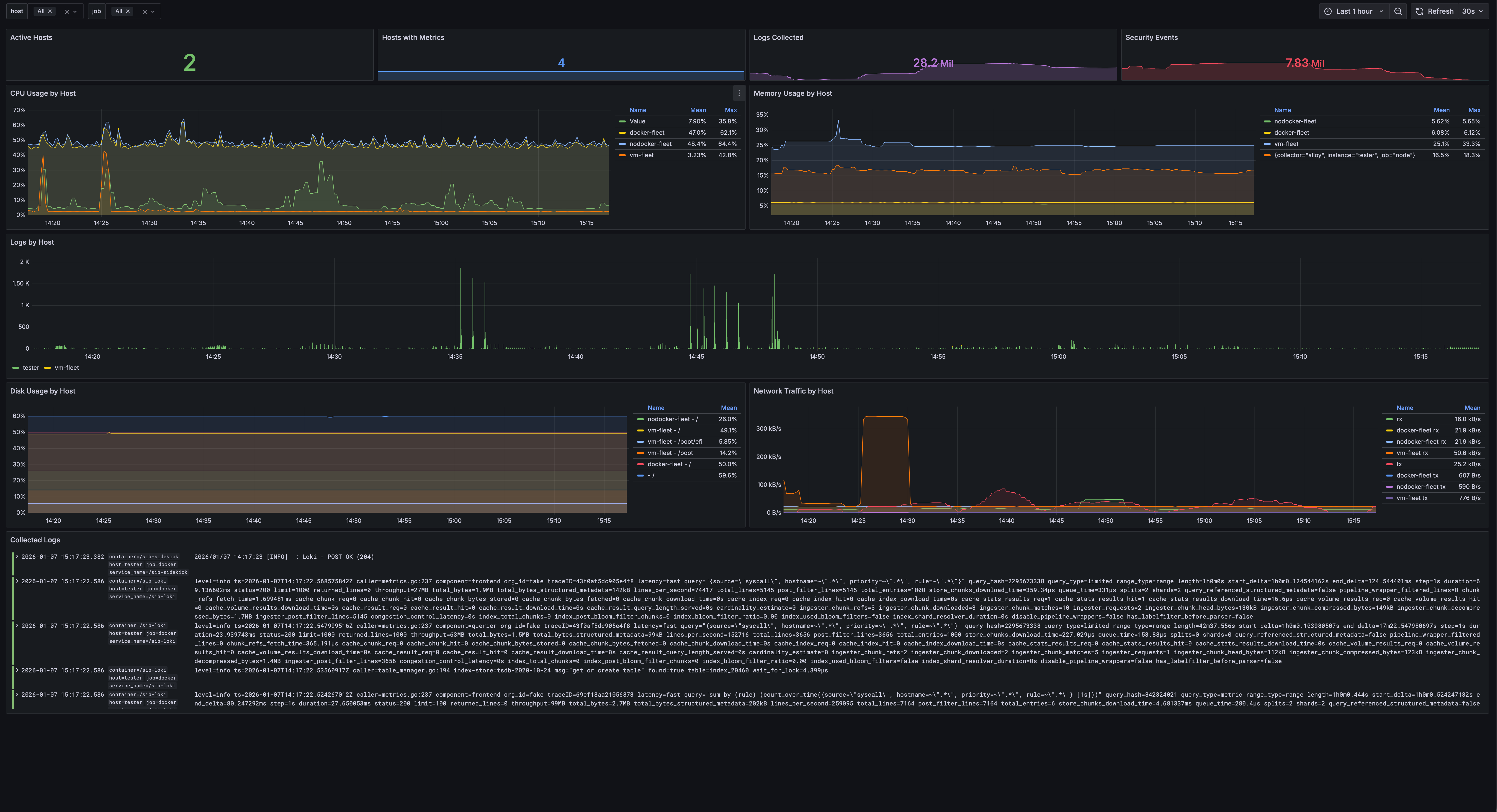
This shows:
- Number of active hosts with collectors
- CPU, memory, disk utilization per host
- Network traffic graphs
- Log volume by host
- Hostname selector to filter all panels
Updating Fleet
Push Rule Updates
make update-rules
This pushes the latest detection rules from detection/config/rules/ to all fleet hosts.
Health Check
make fleet-health
Checks:
- Falco is running
- Collectors are running and shipping data (Vector/vmagent or Alloy)
- Connectivity to SIB server
Troubleshooting
SSH Connection Issues
# Test SSH manually
ssh -i ~/.ssh/id_rsa user@remote-host

# Check SSH key permissions
chmod 600 ~/.ssh/id_rsa

# Test via Ansible
make fleet-ping
Falco Not Starting
# Check kernel version on remote host (need >= 5.8 for modern_ebpf)
ssh user@remote "uname -r"

# Check Falco logs
ssh user@remote "docker logs sib-falco"
# Or for native install
ssh user@remote "journalctl -u falco -n 50"
Common issue: If Falco enters a restart loop, check the driver type. The
modern_ebpfdriver (used for kernel >= 5.8) works on all platforms including KVM VMs. The legacyebpfdriver requires a pre-compiled probe that may not be available in the container image.
Ansible “sudo: not found” Error
This happens when ansible_become: true is set globally (under all.vars). Some tasks run locally inside the Ansible container, which doesn’t have sudo. Move ansible_become: true to the fleet group:
# Wrong — causes errors on local tasks
all:
  vars:
    ansible_become: true   # ← Don't put it here

# Correct — only applies to fleet hosts
fleet:
  vars:
    ansible_become: true   # ← Put it here
No Data in Grafana
- Check storage is externally accessible:
# From a fleet host, test connectivity to VM stack endpoints
curl -s http://SIB_SERVER:9428/health      # VictoriaLogs
curl -s http://SIB_SERVER:8428/-/healthy    # VictoriaMetrics
If these fail, run
make enable-remoteon the SIB server to setSTORAGE_BIND=0.0.0.0. - Check collectors are running:
# VM stack (default) ssh user@remote "docker ps | grep -E 'sib-(vector|vmagent|node-exporter)'" # Grafana stack ssh user@remote "docker ps | grep alloy" - Check collector logs for errors:
ssh user@remote "docker logs sib-vector --tail 50" ssh user@remote "docker logs sib-vmagent --tail 50" - Verify Falcosidekick is receiving events (on SIB server):
docker logs sib-sidekick --tail 20 2>&1 | grep -E "POST|Loki|Victoria"You should see
POST OK (204)messages if events are flowing.
Removing Fleet Agents
# Remove from all hosts
make remove-fleet

# Remove from specific host
make remove-fleet LIMIT=webserver
This stops and removes:
- Falco (native or Docker)
- Collectors (Vector/vmagent/node_exporter or Alloy depending on stack)
- Associated configuration files
| ← Back to Home | AI Analysis → |